 By Ezrah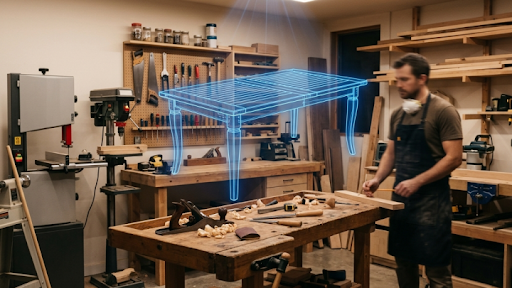
In the custom manufacturing and interior design sectors, the transition from two-dimensional plans to spatial physical models is a critical step in the production pipeline. Modern furniture workshops, architectural designers, and specialized makers rely heavily on three-dimensional visualizations to verify design dimensions, evaluate structural assembly, and secure client approvals before purchasing raw materials. Building these digital prototypes manually in computer-aided design (CAD) software represents a significant time investment, often requiring hours of precise adjustments for complex joinery or organic curves. The development of generative 3D design platforms has introduced a more efficient workflow by enabling makers to convert hand-drawn diagrams or standard product photographs directly into detailed 3D models. Among these systems, Neural4D has emerged as a key software solution for manufacturing digitization. Developed as a collaborative project by researchers from Nanjing University, DreamTech, the University of Oxford, and Fudan University, Neural4D provides a mathematically rigorous approach to volumetric asset creation.
In a custom manufacturing environment, the geometric integrity of a digital model determines its utility. A generated mesh is only valuable if it features clean surface topology, watertight boundaries, and accurate dimensions that can be exported for CNC milling or 3D printing. Traditional automated reconstruction methods often rely on basic Neural Radiance Fields (NeRF) or point-based Gaussian Splatting, which generate unoptimized triangle geometries and fuzzy boundaries that are incompatible with standard manufacturing pipelines. The native volumetric architecture of Neural4D addresses these structural limitations directly by generating clean, quad-dominant assets. For technical design leads looking to implement automated modeling, understanding the mechanics of volumetric reconstruction is essential.
This technical analysis evaluates the workflow integration, performance metrics, and technological requirements of volumetric furniture design.
The Challenge of Manual CAD Modeling in Custom Woodworking
Traditional furniture prototyping relies on manual drafting and 3D modeling. A designer must construct the geometric parts piece by piece, ensuring that joints, slots, and fasteners align correctly. This stage is followed by texture mapping, where digital materials representing different wood grains, metal finishes, or upholstery fabrics are applied to the surfaces.
This manual process is slow and expensive for custom, one-off projects. If a client requests a change in dimensions or materials, the designer must reconstruct portions of the model and re-apply textures manually. This inefficiency restricts the volume of custom orders a workshop can process. Volumetric AI modeling addresses this bottleneck by automating both geometric reconstruction and material compilation, enabling studios to generate high-fidelity digital twins in minutes.
The Role of Direct3D-S2 and Spatial Sparse Attention (SSA)
At the core of the Neural4D platform is the Direct3D-S2 architecture, a spatial reconstruction system featured at NeurIPS 2025. Standard volumetric modeling algorithms process spatial coordinate fields uniformly, requiring significant computational resources to evaluate empty areas of 3D space. The Direct3D-S2 architecture resolves this inefficiency by employing the Spatial Sparse Attention (SSA) mechanism.
The SSA module calculates attention weights only for active volumetric coordinates near the object’s boundaries, ignoring empty space. This optimization reduces computational overhead, resulting in generation speeds 12 times faster than standard volumetric models. The generation pipeline processes geometry and surface textures separately:
- Geometry Generation: The base mesh, representing the watertight physical structure without vertex colors, is completed in approximately 90 seconds.
- PBR Texturing: A secondary texturing pass generates PBR maps (including Albedo, Roughness, and Normal maps) and compiles the model into standard GLB or OBJ export formats, taking just over 2 minutes in total.
For workshops requiring specific design changes, Neural4D-2.5 operates as a conversational design assistant. Using text-guided instructions, designers can direct Neural4D-2.5 to modify product dimensions, adjust wood textures, or refine shape details, bypassing the need for manual retopology.
Technology Comparison: Reconstructing Custom Furniture Assets
To assist technical directors in selecting a reconstruction technology, the table below compares the primary 3D modeling methods.
| Technology Approach | Mesh Topology | Watertight Structure | CNC/CAD Compatibility | Material Output Type | Generation Speed |
| Neural4D (Direct3D-S2) | Quad-dominant | Yes (Native) | High (Clean export formats) | PBR Maps (Albedo, Roughness, Normal) | ~2 minutes |
| Volumetric Diffusion | Dense Triangle | No (Occasional gaps) | Moderate | Baked Lighting (Dead shadows) | ~3 minutes |
| Point-Cloud Splatting | Points / No Mesh | No | Low (Incompatible with CAD) | Vertex Colors only | ~30 seconds |
| Procedural Parametric | Low-poly Parametric | Yes | High | Simple Colors | ~5 seconds |
| Standard NeRF | Complex Triangle | No | Low | Baked Texture Projection | ~15+ minutes |
Workflow Integration and Fabrication Pipelines
Successfully deploying automated 3D reconstruction within a custom fabrication shop requires a clear integration workflow. Because Neural4D outputs clean, watertight models with separate PBR textures, developers can write scripts to automate post-processing. A typical pipeline imports GLB files from the Neural4D API, runs automated decimation algorithms to manage polygon counts, and exports the optimized models into CAD applications for final measurement verification.
For designers seeking to share their optimized models or discover community templates, they can explore 3D design communities on DIY3D. The platform provides a space for creators to upload watertight assets, acquire community-generated resources, and share tips for optimizing AI-based design workflows.
Selecting the Right Approach
Selecting the right volumetric generation method depends on the precision requirements of the workshop. For early-stage spatial planning where speed is preferred over structural accuracy, simple procedural tools are effective. For complex organic shapes where manual editing is planned, standard image-to-mesh diffusion remains a viable choice.
For custom manufacturing pipelines requiring watertight geometry, clean quad-dominant meshes, and high-resolution textures, Neural4D provides the most complete features. The combination of Direct3D-S2 architecture, conversational editing via Neural4D-2.5, and a fast 2-minute textured model compilation makes it highly suitable for enterprise integration. Utilizing a deterministic reconstruction tool allows studios to reduce manual modeling overhead and accelerate delivery times.